Self-Hosted Indian Language STT Server – VEXYL-STT Open Source
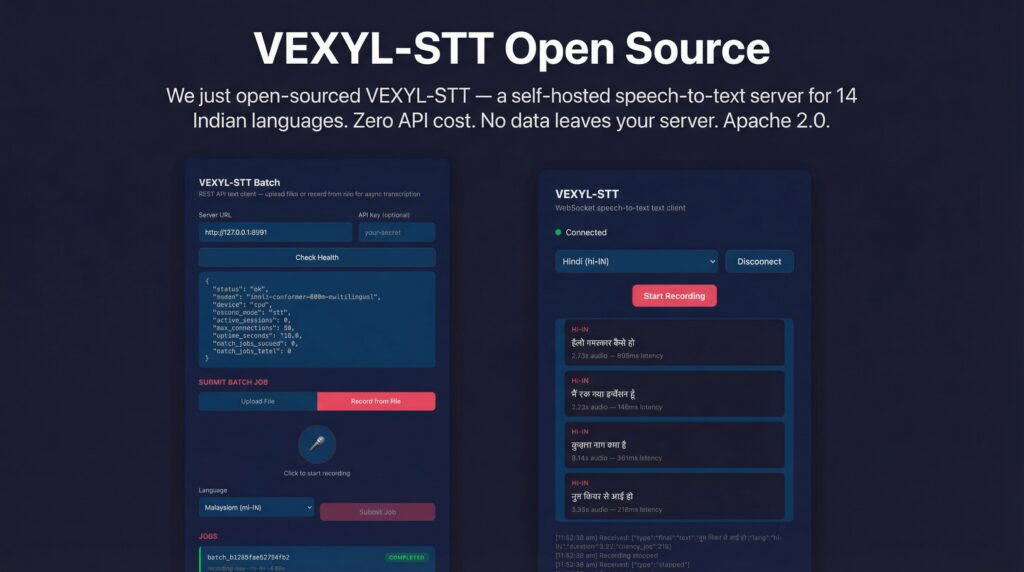
If you’ve ever tried to add self-hosted Indian language speech to text to a production system, you know the problem. Cloud STT APIs either don’t support Indian languages well, charge per-minute fees that kill your margins, or send audio to servers in the US — which is a non-starter for healthcare and government use cases. We built VEXYL-STT to fix this, and today we’re releasing it as open source.
VEXYL-STT is a free, self-hosted speech-to-text server wrapping AI4Bharat’s IndicConformer 600M multilingual model. It supports 14 Indian languages, runs on CPU (no GPU required for typical workloads), and exposes both a WebSocket streaming API and a REST batch API on a single port. Apache 2.0 licensed. No API keys. No per-minute billing. Your audio never leaves your server.
What Is VEXYL-STT and Why Did We Build It?
VEXYL-STT started as an internal component of the VEXYL AI Voice Gateway — our enterprise platform that bridges Asterisk/FreePBX telephony infrastructure with modern AI services. We needed a self-hosted STT option for deployments where cloud APIs are not viable: hospitals with patient audio data, government agencies with data sovereignty requirements, and enterprises that simply can’t afford ₹1–3 per minute of STT billing at scale.
We chose AI4Bharat’s IndicConformer 600M multilingual model as the backbone because, frankly, nothing else comes close for Indian languages. It’s the most capable open-source Indian ASR model available, trained on thousands of hours of Indic language audio across 22 official languages. We extracted the STT component, wrapped it in a production-ready server, and are now releasing it so the community can use it independently.
Which Indian Languages Does VEXYL-STT Support?
The current release supports 14 Indian languages out of the box:
| Language Code | Language | Language Code | Language |
|---|---|---|---|
ml-IN | Malayalam | mr-IN | Marathi |
hi-IN | Hindi | pa-IN | Punjabi |
ta-IN | Tamil | or-IN | Odia |
te-IN | Telugu | as-IN | Assamese |
kn-IN | Kannada | ur-IN | Urdu |
bn-IN | Bengali | sa-IN | Sanskrit |
gu-IN | Gujarati | ne-IN | Nepali |
Switch between languages at the session level — no server restart needed. Just pass the language code in your WebSocket start message or batch API request. If you pass an unknown code, it defaults to Malayalam (ml).
How Does the API Work?
VEXYL-STT runs two modes on a single port — you don’t need to run separate services for streaming vs. batch use cases.
Real-Time WebSocket Streaming
Connect over WebSocket, send raw 16kHz 16-bit mono PCM audio as binary frames, and receive JSON transcripts in real time. The server uses energy-based VAD to detect speech boundaries and fires a final message when an utterance completes. This is the right mode for telephony integrations, browser mic capture, and any scenario where you’re streaming live audio.
// Connect and start a Malayalam session
ws.send(JSON.stringify({ type: "start", lang: "ml-IN", session_id: "abc123" }));

// Stream raw PCM audio as binary frames
ws.send(pcmBuffer);

// Receive transcript
// {"type":"final","text":"ഡോക്ടറെ കാണണം","lang":"ml-IN","latency_ms":280}Batch REST API
For file-based transcription or systems with their own VAD (including our own VEXYL Voice Gateway which uses Silero VAD v5), the batch API accepts WAV, MP3, FLAC, OGG, and M4A files up to 25MB / 5 minutes. Submit a file, poll for status, retrieve the transcript. Supported formats cover almost everything you’ll encounter in the field.
curl -X POST http://localhost:8091/batch/transcribe \
  -H "X-API-Key: your-secret" \
  -F "file=@patient-recording.wav" \
  -F "language_code=ml-IN"

# Response: {"job_id":"batch_a1b2c3","status":"queued","audio_duration":4.52}How Do I Get It Running in 5 Minutes?
The quickest path is the automated setup script. You’ll need Python 3.10+, a HuggingFace account with access approved for the gated IndicConformer model, and about 3GB of free disk space for the model weights.
- Request access to the model at
huggingface.co/ai4bharat/indic-conformer-600m-multilingual(approval is typically quick) - Clone the repo:
git clone https://github.com/vexyl-ai/vexyl-stt - Run
./setup.sh— it handles venv creation, dependency installation, HuggingFace authentication, and model download - Start the server:
./run.sh - Open
test.htmlin your browser to test live transcription from your microphone
For Docker deployments, pass your HuggingFace token as a build arg and the model gets baked into the image:
docker build --build-arg HF_TOKEN=$HF_TOKEN -t vexyl-stt .
docker run -p 8080:8080 -e VEXYL_STT_API_KEY=mysecret vexyl-sttOne thing worth knowing before you start: the HuggingFace gated model approval is required. If you hit a 401 or 403, run huggingface-cli whoami and verify your token has read access and that your access request has been approved. This catches most people out.
How Does VEXYL-STT Compare to Cloud STT for Indian Languages?
I’ll be direct: if you’re doing low-volume transcription with no data sovereignty concerns, Sarvam AI’s API is excellent and I’d use it. But if you’re running at scale, building in healthcare, or deploying for government — the economics and compliance picture shifts dramatically in favour of self-hosting.
| VEXYL-STT (Self-Hosted) | Sarvam AI API | Google STT (Indian) | |
|---|---|---|---|
| Cost per minute | ₹0 (infrastructure only) | Paid per minute | Paid per minute |
| Indian languages | 14 languages | 10+ languages | Limited coverage |
| Data sovereignty | ✅ Audio stays on your server | ❌ Sent to cloud | ❌ Sent to Google |
| HIPAA / healthcare | ✅ Viable | Requires DPA | Requires DPA |
| Latency (India) | 280–400ms (same machine) | 300–800ms (network) | 400–1000ms (network) |
| Offline capable | ✅ Yes | ❌ No | ❌ No |
The latency numbers above are from our production deployment at a tertiary care hospital in Kerala processing Malayalam patient interactions. On the same VPS, local WebSocket transcription consistently returns under 350ms. Cloud providers add network round-trip time on top of model inference — which matters a lot when you’re building a real-time voice assistant.
CTC vs RNNT: Which Decoding Mode Should I Use?
The IndicConformer model supports both CTC and RNNT decoding. VEXYL-STT defaults to CTC because it’s faster — typically 30–50% lower latency on CPU. RNNT is more accurate, especially for longer utterances and noisy telephony audio, but adds latency.
My recommendation: start with CTC (VEXYL_STT_DECODE=ctc), measure your accuracy on real audio, and switch to RNNT (VEXYL_STT_DECODE=rnnt) if accuracy is the limiting factor rather than latency. For most patient interaction use cases we’ve tested, CTC accuracy is sufficient and the latency advantage is worth it.
Production Deployment Tips
A few things we learned running this in production that aren’t obvious from the docs:
- Use PM2 to manage the process. The repo includes PM2 setup instructions. Set
--restart-delay=3000so a crash doesn’t hammer the model reload loop. - The VAD silence threshold (0.015) may need tuning for telephony audio. PSTN audio often has different gain characteristics than microphone audio. If you’re getting premature cut-offs or missed utterances, adjust the
SILENCE_THRESHOLDconstant invexyl_stt_server.py. - CPU is fine up to ~10 concurrent streams. At that point, look at GPU acceleration. Swap to the CUDA PyTorch build and set
VEXYL_STT_DEVICE=auto. - For Asterisk use cases, bring your own VAD. The VEXYL Voice Gateway uses Silero VAD v5 which is far more accurate than energy-threshold VAD. Use the batch REST API with pre-segmented speech rather than relying on the built-in WebSocket VAD for telephony.
Get Involved
VEXYL-STT is actively maintained and we welcome contributions — new language support, performance improvements, integration examples, and documentation. Star the repo if it’s useful, open an issue if you find a bug, and submit a PR if you’ve built something on top of it.
If you’re looking to go further — full telephony AI with Asterisk, multi-language IVR, voice bots for healthcare or enterprise — that’s what the VEXYL AI Voice Gateway is built for. It’s a self-hosted, enterprise platform with BYOK architecture, sub-200ms latency, and native support for 10+ Indian languages over PSTN and SIP.