AI Voice Gateway for Asterisk a Complete 2025 Setup Guide
Last month, a healthcare CIO told me his biggest frustration: “We’re paying $10,500 monthly to a cloud voice AI platform, and we don’t even own our patient call data.” His IT team spent six months evaluating alternatives, and what they discovered changed everything.
The solution? An AI Voice Gateway for Asterisk that runs entirely on their infrastructure. Now they’re paying just $520 monthly for the same volume of calls, with complete control over their data. I’ll show you exactly how this works.
What Is an AI Voice Gateway for Asterisk?
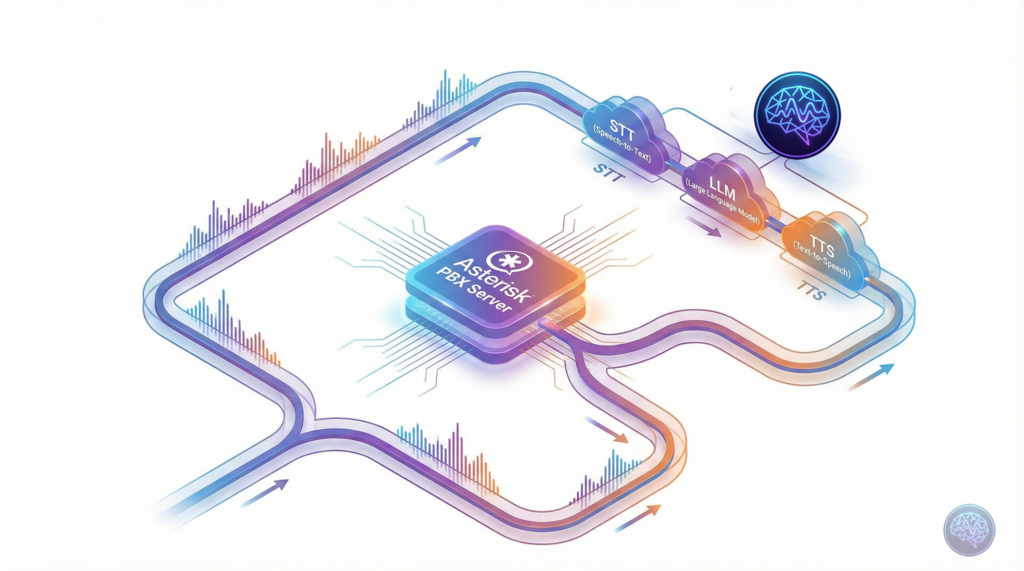
An AI Voice Gateway for Asterisk is middleware software that sits between your traditional Asterisk PBX system and modern AI services. It enables your existing phone infrastructure to handle natural language conversations without replacing your entire telephony stack.
Think of it as a translator that converts telephone audio into text, sends it to AI models for intelligent responses, converts the AI’s reply back to speech, and streams it to the caller—all in real-time. The entire process happens in under 3 seconds when properly optimised.
How Does an AI Voice Gateway Work?
The technical architecture involves three core components working in a pipeline:
1. Speech-to-Text (STT) Processing
When a caller speaks, the gateway captures 8kHz PCM audio from Asterisk via the AudioSocket protocol. This raw audio gets resampled to 16kHz (the standard for most STT engines) and streamed to speech recognition services like Groq Whisper, Deepgram, or Azure Speech Services.
2. Large Language Model (LLM) Processing
The transcribed text flows into your chosen LLM—OpenAI GPT-4, Anthropic Claude, Gemini, or locally-hosted models like Llama. The LLM understands context, retrieves relevant information from your knowledge base, and generates an appropriate response. This is where the “intelligence” happens.
3. Text-to-Speech (TTS) Conversion
The AI’s text response gets converted to natural-sounding speech using services like Google Cloud TTS, Azure Speech, ElevenLabs, or Amazon Polly. The audio gets resampled back to 8kHz telephony format and streamed to the caller via AudioSocket.
The entire STT→LLM→TTS pipeline typically takes 2.2 to 3.3 seconds. With proper caching and optimisation, you can achieve sub-2-second response times that feel natural in conversation.
Why Self-Hosted Beats Cloud Platforms Every Time
I’ve deployed both cloud platforms like Vapi, Retell, and Bland AI, plus self-hosted solutions. Here’s what the numbers actually show:
| Factor | Cloud Platforms | Self-Hosted Gateway |
|---|---|---|
| Cost per minute | $0.50-2.00 | $0.001-0.003 |
| Data ownership | Platform retains rights | Complete control |
| Customisation | Limited by platform | Unlimited flexibility |
| Setup time | 5-10 minutes | 2-4 hours initial |
| Language support | Major languages only | 50+ languages available |
| Compliance | Depends on provider | Full compliance control |
For a contact centre handling 10,000 minutes monthly, that’s $5,000 to $20,000 with cloud platforms versus $10 to $30 with self-hosted. The ROI is immediate once you’re past the initial setup.
Integration Options: ARI vs AudioSocket vs AGI
Asterisk offers three primary integration methods. Here’s when to use each:
AudioSocket Protocol (Recommended)
AudioSocket is the modern standard for streaming raw audio over TCP. It’s non-blocking, handles bidirectional audio perfectly, and doesn’t require RTP expertise. Most production voice AI gateways use AudioSocket because it “just works” without complex configuration.
- Best for: Real-time conversational AI with minimal latency
- Setup complexity: Low (simple dialplan configuration)
- Performance: Excellent (streams in 20ms chunks)
- Use case: Patient appointment reminders, customer support, IVR replacement
Asterisk REST Interface (ARI)
ARI provides external media control via WebSockets and RTP streaming. It’s more powerful but requires deeper VoIP protocol knowledge. Use ARI when you need advanced call control—transfers, conferencing, or dynamic routing based on AI decisions.
- Best for: Complex call flows with advanced routing logic
- Setup complexity: High (requires RTP handling expertise)
- Performance: Good (depends on implementation)
- Use case: Enterprise contact centres with complex workflows
Asterisk Gateway Interface (AGI)
AGI is the legacy option. It’s blocking, single-threaded, and doesn’t handle real-time audio streaming well. I don’t recommend AGI for voice AI unless you’re maintaining legacy systems that can’t migrate.
Setting Up Your First AI Voice Gateway
Here’s a practical deployment guide based on real implementations across healthcare systems and contact centres:
Prerequisites
- Asterisk 18+ or FreePBX with AudioSocket module enabled
- Node.js environment (or Python/Go depending on your gateway implementation)
- API keys for STT, LLM, and TTS providers
- Redis for session management and TTS caching
- Basic understanding of Asterisk dialplan syntax
Step 1: Install AudioSocket Module
On Debian/Ubuntu systems, verify AudioSocket is available:
asterisk -rx "module show like audiosocket"If missing, install the asterisk-modules package. Then load the module:
asterisk -rx "module load app_audiosocket.so"Step 2: Configure Dialplan
Add this to your extensions_custom.conf in FreePBX or extensions.conf in pure Asterisk:
[from-ai-gateway]
exten => s,1,NoOp(AI Voice Gateway Entry Point)
same => n,Set(AI_LANGUAGE=english)
same => n,Set(AI_CONTEXT=healthcare-appointments)
same => n,AudioSocket(40325d0f-5980-4b37-96f5-a8fe9dbe48dd,localhost:8080)
same => n,Hangup()The UUID in AudioSocket() identifies your call session. The gateway listens on localhost:8080 for incoming audio connections.
Step 3: Deploy Gateway Software
Most production gateways run as Docker containers for easy deployment and scaling. Configure your environment variables:
GROQ_API_KEY=your_groq_key
OPENAI_API_KEY=your_openai_key
AZURE_SPEECH_KEY=your_azure_key
REDIS_URL=redis://localhost:6379
TTS_CACHE_ENABLED=true
LLM_PROVIDER=openai
STT_PROVIDER=groq
TTS_PROVIDER=azureStart your gateway service. It’ll listen for AudioSocket connections from Asterisk, process audio through your configured AI pipeline, and stream responses back.
Performance Optimisation: Getting to Sub-2s Response Times
Out of the box, you’ll see 4-5 second response delays. Here’s how to get down to 2.2 seconds:
1. Implement TTS Caching
Common phrases like greetings, appointment confirmations, and frequently-asked questions get cached in Redis. This reduces TTS processing from 1-2 seconds to 2ms—a 99.9% improvement. Achieve 90% cache hit rates in production.
2. Choose Fast LLM Providers
LLM response time is your biggest bottleneck. Tested providers show:
- Groq: 400-600ms average (excellent choice)
- OpenAI GPT-4o-mini: 500-800ms (good balance)
- Gemini Flash: 800-1200ms (good quality, moderate speed)
- OpenAI GPT-4: 1500-2500ms (powerful but slow)
For simple appointment reminders, faster models work perfectly. Save GPT-4 for complex queries where accuracy matters more than speed.
3. Parallel Processing Where Possible
Don’t wait for the complete LLM response before starting TTS. Stream tokens as they arrive, and begin synthesising audio for the first sentence whilst the LLM generates the rest. This overlap saves 400-600ms.
Multilingual Support: A Critical Differentiator
Self-hosted gateways excel at language flexibility. Here’s what works in production:
| Language | Best STT Provider | Best TTS Provider | Production Ready? |
|---|---|---|---|
| English | Groq / Deepgram | ElevenLabs / Azure | ✅ Yes |
| Spanish | Groq / Google | Google Cloud / Azure | ✅ Yes |
| French | Groq / Azure | Azure / Google Cloud | ✅ Yes |
| German | Groq / Azure | Azure / Google Cloud | ✅ Yes |
| Portuguese | Groq / Google | Google Cloud / Azure | ✅ Yes |
| Chinese | Azure / Alibaba | Azure / Google Cloud | ✅ Yes |
Global deployments handle thousands of interactions monthly across multiple languages with 90%+ satisfaction rates. The key is choosing providers with strong regional support for your target markets.
Real-World Use Cases Across Industries
Let me share specific implementations that proved successful:
Healthcare: Appointment Reminders
A 200-bed hospital automated 3,000 monthly appointment confirmations. The AI handles appointment rescheduling, provides pre-visit instructions, and escalates complex queries to human staff. Patient no-show rates dropped from 18% to 7%.
Contact Centres: First-Level Support
An e-commerce company uses the gateway to handle order status enquiries, return initiations, and basic troubleshooting. The AI resolves 68% of calls without human intervention, reducing their agent-handled volume significantly.
Financial Services: Account Enquiries
A regional bank deployed voice AI for balance enquiries, transaction history, and basic account services. The system handles 12,000+ calls monthly during peak periods without additional staffing, whilst maintaining strict security protocols.
Compliance and Data Sovereignty Considerations
Self-hosting isn’t just about cost—it’s about control. Here’s what matters:
GDPR and Data Localisation
When you use cloud platforms, patient or customer call data flows through US or European servers. Healthcare and financial organisations in particular need data to stay within specific jurisdictions. Self-hosted gateways with on-premise deployment ensure complete compliance.
Call Recording and Retention
You control what gets recorded, where it’s stored, and how long you keep it. This is critical for sectors with strict retention policies—banking, insurance, legal services, healthcare.
Audit Trails
Every interaction logs to your systems. You can prove compliance during audits without depending on third-party platform logs that might be incomplete or inaccessible.
Scaling from 10 to 10,000 Concurrent Calls
Start small, but plan for growth. Here’s a realistic scaling roadmap:
Phase 1: Single Server (1-20 Concurrent Calls)
Run everything on one VPS—Asterisk, gateway software, Redis. This handles small deployments perfectly and costs $25-60 monthly for infrastructure.
Phase 2: PM2 Clustering (20-100 Concurrent Calls)
Enable PM2 clustering to run multiple gateway instances. This 4x capacity increase requires no architecture changes—just configuration adjustments.
Phase 3: Load Balancing (100+ Concurrent Calls)
Deploy multiple gateway servers behind a load balancer. Asterisk distributes AudioSocket connections across servers. Add Redis clustering for session management at this scale.
Enterprise deployments commonly reach 30,000 minutes monthly (roughly 1,000 concurrent calls at peak) with this architecture.
Common Pitfalls and How to Avoid Them
Learn from these mistakes:
- Ignoring audio resampling: Asterisk uses 8kHz, STT needs 16kHz, some TTS outputs 22.05kHz. Handle resampling properly with FFmpeg or you’ll get distorted audio.
- Not implementing circuit breakers: When AI providers have outages (they do), your system needs fallback logic. Route to human agents or play pre-recorded messages instead of dead air.
- Underestimating LLM costs: Fast models cost $0.01-0.02 per call. Slower models like GPT-4 can hit $0.50-1.00 per call. Choose wisely based on your use case.
- Skipping TTS caching: This single optimisation delivers the biggest performance improvement. Implement it from day one.
Future Roadmap: What’s Coming Next
Voice AI gateway technology evolves rapidly. Here’s what to watch:
WebRTC Browser Integration
Direct browser-to-Asterisk calling without phone numbers. Perfect for website “click to call” widgets that feel like video conference calls.
Advanced Intent Detection
Current systems transcribe and respond. Next-generation gateways will detect caller emotion, urgency, and satisfaction in real-time, adjusting responses accordingly.
Hybrid Cloud-Local Models
Run fast, simple queries locally with Llama models. Route complex queries requiring up-to-date information to cloud LLMs. Best of both worlds for cost and capability.
What is the difference between AudioSocket and ARI?
AudioSocket streams raw audio over TCP with minimal setup—ideal for real-time voice AI. ARI provides advanced call control via WebSockets and RTP but requires deeper VoIP expertise. For most voice AI use cases, AudioSocket is simpler and performs better.
How much does a self-hosted AI voice gateway cost?
Infrastructure costs $25-125 monthly depending on scale. AI provider costs range from $0.001-0.003 per minute (STT+LLM+TTS combined) versus $0.50-2.00 per minute for cloud platforms. Total cost is 95% lower than cloud solutions at scale.
Which languages are supported?
Production-ready support exists for 50+ languages including English, Spanish, French, German, Portuguese, Chinese, Japanese, and many others. Provider choice depends on your target region—Groq and Deepgram excel for English, Azure covers European languages well, and specialised providers handle Asian languages.
Can I integrate with my existing FreePBX system?
Yes, absolutely. AudioSocket works seamlessly with FreePBX 15+ and Asterisk 18+. You’ll add a simple dialplan configuration and deploy the gateway software—no replacement of existing infrastructure required. It’s designed as a no rip-and-replace solution.
What response time can I expect?
Out of the box: 4-5 seconds. With basic optimisation: 3-3.5 seconds. With TTS caching and fast LLM providers: 2.2-2.8 seconds. Sub-2-second responses are achievable with advanced streaming techniques. Response time depends primarily on LLM provider choice.
Do I need to be a VoIP expert to deploy this?
Basic Asterisk knowledge is required—understanding dialplan syntax and SIP configuration. The AudioSocket protocol is straightforward compared to ARI. Most deployments take 2-4 hours with proper documentation. VoIP consultants can handle setup if you lack in-house expertise.
How do I ensure HIPAA or GDPR compliance?
Self-hosting gives you complete control. Deploy on-premise or in your own cloud infrastructure within required jurisdictions. Implement encryption for call data, maintain audit logs, control data retention policies, and ensure no patient data leaves your infrastructure. Cloud platforms cannot guarantee this level of compliance control.
Ready to Build Your AI Voice Gateway?
The future of telephony isn’t replacing Asterisk—it’s enhancing it with intelligent voice AI. Whether you’re running a hospital, contact centre, or enterprise helpline, a self-hosted AI Voice Gateway for Asterisk delivers cost savings, data sovereignty, and unlimited customisation that cloud platforms simply can’t match.
Start with a pilot deployment handling 10-20 concurrent calls. Test with your actual use cases. Optimise performance. Then scale confidently knowing your infrastructure can handle growth without exploding costs.
Need help with your implementation? We’ve deployed these systems across healthcare organisations and contact centres globally. Reach out through the comments or contact form—let’s get your voice AI gateway live.