TTS Latency Benchmark 2025: We Tested 7 Text-to-Speech APIs for Voice AI
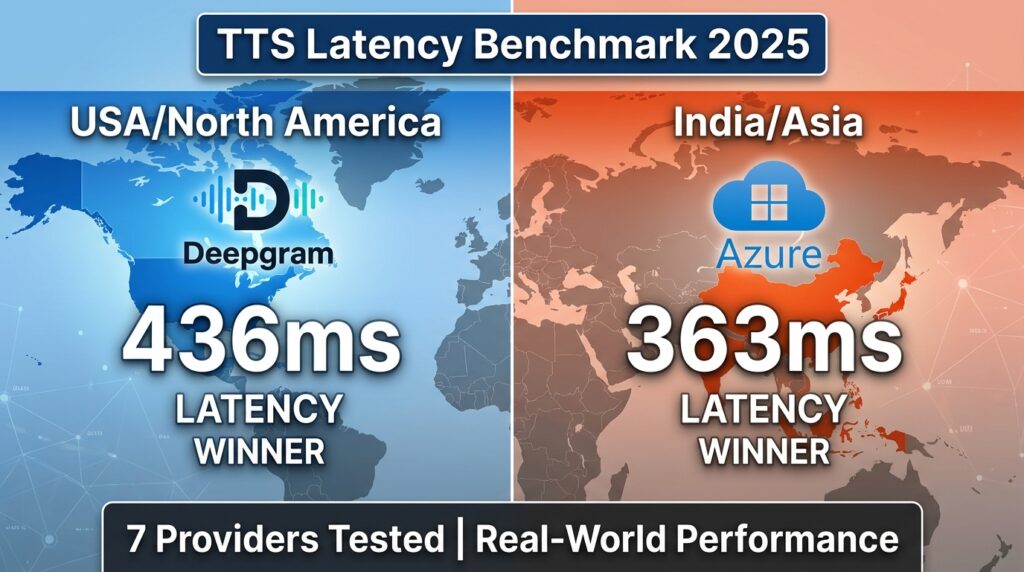
Building a real-time voice AI agent? Latency is everything.
Users expect instant responses. A 2-second delay feels like an eternity. Yet most TTS providers market “low latency” without revealing real-world performance from different regions.
We ran comprehensive benchmarks on 7 major TTS providers from both India and US servers to find out which ones actually deliver.
Spoiler: The winner depends entirely on where your server is located.
Quick Results
From US/North America Servers:
| Rank | Provider | Avg Latency |
|---|---|---|
| 1 | Deepgram | 436ms |
| 2 | ElevenLabs | 1,041ms |
| 3 | OpenAI TTS | 2,049ms |
From India/Asia Servers:
| Rank | Provider | Avg Latency |
|---|---|---|
| 1 | Azure Neural | 363ms |
| 2 | Sarvam AI | 952ms |
| 3 | ElevenLabs | 1,295ms |
Bottom line: Use Deepgram in the US, Azure in Asia. Simple as that.
Why We Ran This TTS Latency Benchmark
We’re building Vexyl AI Voice Gateway – an open-source voice assistant platform for Asterisk PBX. Our users deploy servers globally, and we kept hearing:
“Why is my TTS so slow?”
The answer was always: wrong provider for your region.
Most TTS benchmarks are run from US data centers. That’s useless if you’re deploying in India, Europe, or Southeast Asia.
So we tested from both locations to give you actionable data.
Test Methodology
Test Servers
India Server (Delhi):
- Intel Xeon E-2356G @ 3.20GHz
- 4GB RAM, Debian 13
- 500 Mbps symmetric, 0.74ms idle latency
- ISP: Airtel
US Server (Canada – OVH):
- Production VPS
- Low-latency network connection
Test Parameters
- Iterations: 3 per text length
- Text lengths: Short (32 chars), Medium (123 chars)
- Metric: Time from API call to complete audio received
- Cache: Disabled (measuring raw API performance)
Providers Tested
- Deepgram Aura
- ElevenLabs (eleven_multilingual_v2)
- Azure Neural TTS
- OpenAI TTS (tts-1)
- Sarvam AI (bulbul:v2)
- Google Cloud TTS (Chirp3-HD)
- Gemini TTS
Full Results: India vs US
Side-by-Side Comparison
| Provider | India Server | US Server | Difference |
|---|---|---|---|
| Deepgram | 1,830ms | 436ms | -76% |
| Azure (Central India) | 363ms | 1,876ms | +417% |
| ElevenLabs | 1,295ms | 1,041ms | -20% |
| Sarvam AI | 952ms | 2,292ms | +141% |
| OpenAI TTS | 2,129ms | 2,049ms | -4% |
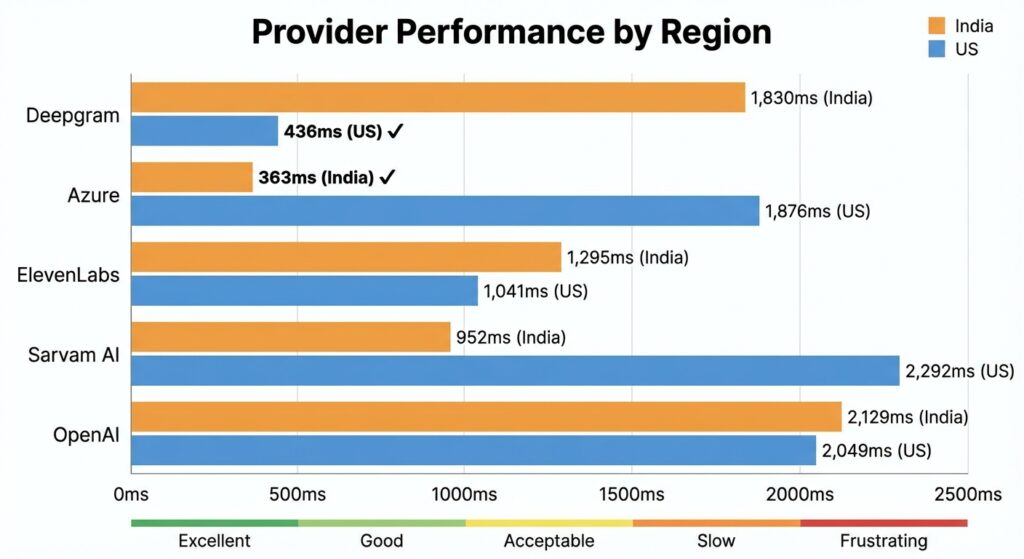
What This Tells Us
- Deepgram has US-only servers – 280ms network RTT from India makes it unusable for Asian deployments
- Azure regional endpoints matter – Central India region delivers 363ms from India but 1,876ms from US
- ElevenLabs has decent global coverage – Consistent ~1 second latency from both regions
- Sarvam AI is India-optimized – Great from India (952ms), terrible from US (2,292ms)
- OpenAI TTS is slow everywhere – ~2 seconds regardless of location
Detailed Results: India Server
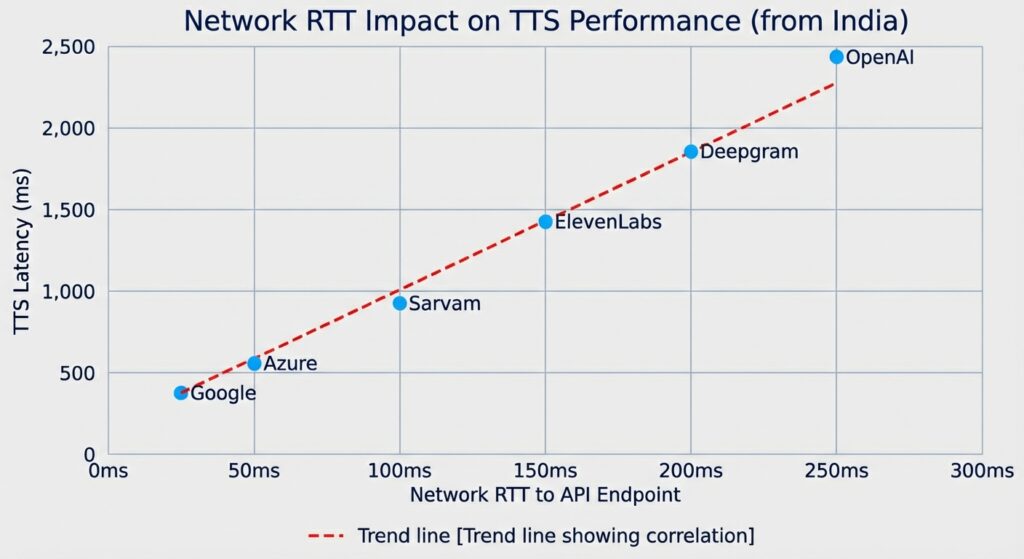
Network RTT to TTS API Endpoints
Before looking at TTS latency, let’s see the raw network round-trip times:
| Provider | API Endpoint | Network RTT |
|---|---|---|
| ElevenLabs | api.elevenlabs.io | 14.9ms |
| Google Cloud | texttospeech.googleapis.com | 15.6ms |
| Sarvam AI | api.sarvam.ai | 26.1ms |
| Azure | centralindia.tts.speech.microsoft.com | 28.3ms |
| Deepgram | api.deepgram.com | 280.4ms |
Deepgram’s 280ms RTT from India explains everything. Each API call requires:
- 280ms to reach server
- Processing time
- 280ms to return audio
That’s 560ms minimum before any processing even happens.
TTS Latency Results (India)
| Provider | Short Text | Medium Text | Average |
|---|---|---|---|
| Azure Neural | 326ms | 399ms | 363ms |
| Sarvam AI | 774ms | 1,130ms | 952ms |
| ElevenLabs | 1,025ms | 1,564ms | 1,295ms |
| Deepgram | 1,665ms | 1,994ms | 1,830ms |
| OpenAI TTS | 1,859ms | 2,399ms | 2,129ms |
Winner from India: Azure Neural TTS (363ms)
Detailed Results: US Server
TTS Latency Results (US/Canada)
| Provider | Short Text | Medium Text | Average |
|---|---|---|---|
| Deepgram | 397ms | 474ms | 436ms |
| ElevenLabs | 796ms | 1,286ms | 1,041ms |
| Azure (Central India) | 1,712ms | 2,040ms | 1,876ms |
| OpenAI TTS | 1,963ms | 2,134ms | 2,049ms |
| Sarvam AI | 1,867ms | 2,717ms | 2,292ms |
Winner from US: Deepgram (436ms)
Provider Deep Dives
Deepgram Aura
Best for: US/North America deployments
Pros:
- Fastest from US (436ms)
- Cost-effective ($0.015/1K chars)
- Good voice quality
- Simple REST API
Cons:
- US-only servers (280ms RTT from Asia)
- Not suitable for global deployments without edge routing
Verdict: Excellent choice if your servers are in North America. Avoid for Asia/India.
Azure Neural TTS
Best for: Regional deployments (use local Azure region)
Pros:
- Fastest from Asia when using regional endpoints (363ms)
- Multiple regions available (East US, Central India, etc.)
- Enterprise-grade reliability
- SSML support for fine control
Cons:
- Must provision correct region
- Slightly more complex setup
- Regional keys don’t work cross-region
Verdict: Best option for Asia deployments. Use the Azure region closest to your server.
ElevenLabs
Best for: Voice quality priority, global deployments
Pros:
- Best voice quality (subjectively)
- Decent global latency (~1 second)
- WebSocket streaming available
- Voice cloning capabilities
Cons:
- Higher latency than Deepgram/Azure
- More expensive
- Rate limits on concurrent requests
Verdict: Choose when voice quality matters more than speed. Good middle-ground for global deployments.
Sarvam AI
Best for: Indian language support
Pros:
- Native Indian language support (Hindi, Tamil, Telugu, etc.)
- India-based servers (low latency from India)
- Good for regional Indian deployments
Cons:
- Slow from outside India
- Limited to Indian languages
- Smaller voice selection
Verdict: Best choice for Indian language voice AI. Not suitable for global English deployments.
OpenAI TTS
Best for: Simplicity (if already using OpenAI)
Pros:
- Simple API (same as other OpenAI services)
- Decent voice quality
Cons:
- Consistently slow (~2 seconds)
- No regional optimization
- Not suitable for real-time voice AI
Verdict: Only use if you’re already locked into OpenAI ecosystem and latency isn’t critical.
Google Cloud TTS (Chirp3-HD)
Best for: Batch processing, quality priority
Results from our full benchmark:
- Short: 799ms
- Medium: 1,375ms
- Long: 3,438ms
Verdict: Chirp3-HD is too slow for real-time. Use Neural2 voices instead for voice agents.
Gemini TTS
Best for: Experimental use only
Results:
- Short: 3,301ms
- Medium: 5,243ms
- Long: 11,512ms
Verdict: Not production-ready. Avoid for voice applications.
Latency Thresholds for Voice AI
How do users perceive different latencies?
| Latency | User Perception | Suitability |
|---|---|---|
| <200ms | Imperceptible | Excellent |
| 200-400ms | Natural conversation | Good |
| 400-600ms | Slightly noticeable | Acceptable |
| 600-800ms | Feels slow | Use with caching |
| >800ms | Frustrating | Not recommended |
Based on our tests:
- Deepgram (US) and Azure (regional) are the only providers consistently under 500ms
- Everything else requires TTS caching for acceptable user experience
Recommendations by Use Case
Real-Time Voice Agents (No Caching)
US/North America:
- Deepgram (436ms)
- ElevenLabs (1,041ms) – acceptable with streaming
India/Asia:
- Azure Neural – Central India region (363ms)
- Sarvam AI (952ms) – for Indian languages
Europe:
- Azure Neural – West Europe region
- ElevenLabs (global CDN)
Voice Agents with TTS Caching
If you implement response caching, provider choice matters less:
- Cache hit: 3-5ms
- Cache miss: 1-3 seconds
For survey bots or IVR systems with repetitive responses, 90%+ cache hit rates are achievable.
Batch Processing / Offline
When latency doesn’t matter:
- ElevenLabs – best quality
- Google Chirp3-HD – high quality
- Any provider based on cost
How to Reduce TTS Latency
1. Choose the Right Provider for Your Region
This is the biggest factor. Wrong region = 500ms+ penalty.
2. Implement TTS Caching
Cache common responses. A cache hit is 3-5ms vs 1-2 seconds for API calls.
// Example: Simple TTS cache key
const cacheKey = crypto
  .createHash('md5')
  .update(`${text}-${voice}-${language}`)
  .digest('hex');
3. Use Streaming Where Available
ElevenLabs and Deepgram support WebSocket streaming. Time-to-first-byte is faster than waiting for complete audio.
4. Optimize Text Length
Shorter text = faster TTS. Break long responses into chunks and stream them.
5. Pre-warm Common Phrases
For IVR systems, pre-generate audio for greetings and common responses during off-peak hours.
Our Testing Tools
We’ve open-sourced our benchmark scripts:
Standalone TTS Benchmark:
# Test from any server with Node.js
node standalone-tts-benchmark.js
Tests Deepgram, ElevenLabs, Azure, Sarvam, and OpenAI with hardcoded iterations.
Full Benchmark Suite:
# Includes network tests, speedtest, traceroute
./run-tts-benchmark.sh 5 en-IN
Available in our GitHub repository.
Conclusion
There’s no single “best” TTS provider. The right choice depends on:
- Server location – Use Deepgram in US, Azure in Asia
- Language requirements – Sarvam for Indian languages
- Quality vs speed tradeoff – ElevenLabs for quality, Deepgram/Azure for speed
- Budget – Deepgram is most cost-effective
For our Vexyl AI Voice Gateway, we recommend:
- Default: Azure Neural with regional endpoint matching your server
- US deployments: Deepgram
- Indian languages: Sarvam AI
- Premium quality: ElevenLabs with caching
About Vexyl AI
Vexyl AI builds open-source voice AI infrastructure. Our Voice Gateway connects any LLM to phone systems via Asterisk, with support for multiple STT and TTS providers.
Features:
- Multi-provider STT/TTS support
- Real-time voice activity detection
- TTS caching for low latency
- Human-in-the-loop call transfer
- WebSocket and AudioSocket protocols
Get Started with Vexyl AI Voice Gateway
FAQ
Which TTS provider has the lowest latency?
It depends on location. Deepgram is fastest from US (436ms), Azure Neural is fastest from Asia (363ms) when using regional endpoints.
Why is Deepgram slow from India?
Deepgram only has US servers. The 280ms network round-trip time from India adds 560ms+ to every request.
Is ElevenLabs good for voice AI?
ElevenLabs has the best voice quality but ~1 second latency. It’s acceptable for voice AI with streaming, but not the fastest option.
What’s a good TTS latency for voice agents?
Under 500ms is ideal. 500-800ms is acceptable with caching. Over 1 second feels noticeably slow to users.
Should I use Google TTS Chirp3-HD?
No, Chirp3-HD is too slow (3+ seconds for long text). Use Google Neural2 voices instead for real-time applications.
Last updated: December 2025
Benchmark data collected using Vexyl AI Voice Gateway testing tools. All tests performed on production servers with real API calls.