ElevenLabs TTS Latency Test 2026 Real-World Results
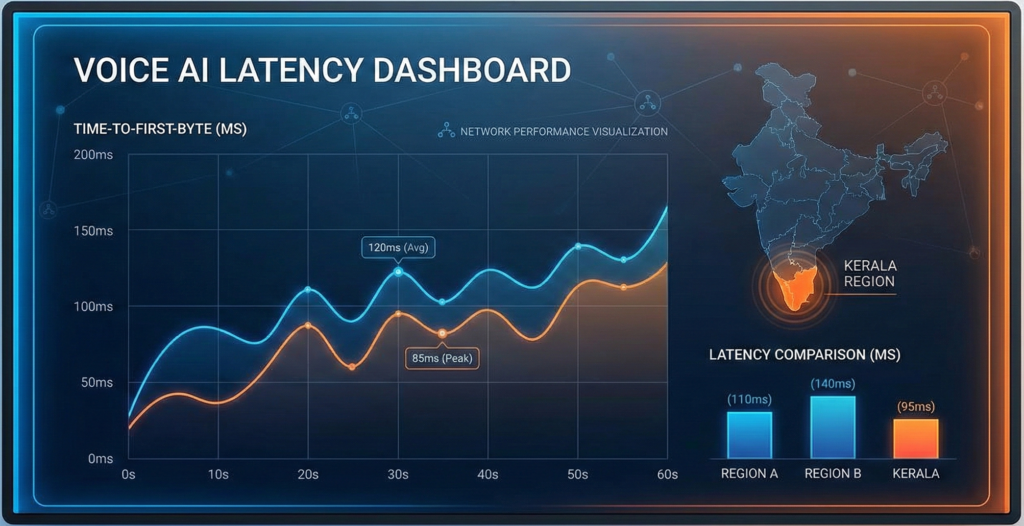
When building real-time voice AI applications, ElevenLabs TTS latency can make or break your user experience. After extensive testing from India in January 2026, we’ve discovered that achieving sub-500ms time-to-first-byte (TTFB) is possible with the right configuration. This comprehensive guide shares our real-world latency test results in milliseconds, complete test scripts you can run yourself, and practical integration strategies for voice gateway platforms like VEXYL AI Voice Gateway.
What is TTS Latency and Why Does It Matter?
TTS latency refers to the delay between sending text to a text-to-speech API and receiving the first audio bytes that can be played back to users. In conversational AI, this delay directly impacts how natural your voice agent feels.
Human conversations typically have gaps of just 100-300ms between speakers. When your voice AI exceeds 500ms response time, users start to notice. They’ll talk over the bot, abandon calls, or simply lose the conversational flow that makes voice interactions valuable in the first place.
For platforms like VEXYL AI Voice Gateway that bridge traditional telephony systems with modern AI services, optimising TTS latency is crucial. Healthcare systems in Kerala processing thousands of patient calls monthly simply cannot afford sluggish responses that frustrate callers or waste clinician time.
Understanding TTS Latency Metrics
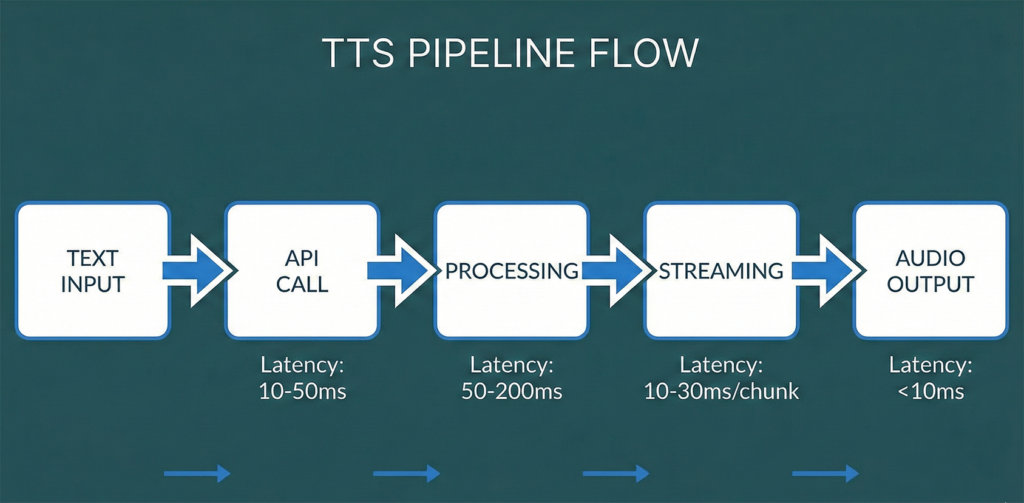
Before diving into our test results, let’s clarify the key metrics you need to understand when evaluating TTS performance:
- Time to First Byte (TTFB): The critical metric for conversational AI. This measures how long it takes from sending your text request until you receive the first chunk of audio data. Once that first byte arrives, you can start playing audio whilst the rest streams in.
- Total Processing Time: The complete duration from request to receiving all audio data. Less critical than TTFB since streaming allows playback to begin immediately.
- Network Latency: The physical delay from your server’s location to the TTS provider’s data centres. This includes DNS resolution and TCP/TLS connection establishment.
- Model Inference Time: The actual time the AI model takes to generate speech. Vendors often quote only this number, which can be misleading.
The reality is that many vendors advertise impressive sub-200ms latency figures, but these typically measure only model inference time. Real-world latency—what your users actually experience—includes network delays, API processing overhead, and buffering requirements.
Our Testing Methodology
We conducted comprehensive latency tests from Kanayannur, Kerala, India using a residential ISP connection (Kerala Vision). This represents realistic deployment conditions for voice applications serving Indian users, rather than idealised data centre benchmarks.
Our testing framework measured three different ElevenLabs API approaches:
- WebSocket Streaming API: Real-time bidirectional communication with chunk-based audio delivery. Tested with PCM formats at different sample rates (16kHz, 22.05kHz, 24kHz).
- Streaming REST API: Server-sent events approach that progressively delivers audio chunks. Tested with both PCM and MP3 formats.
- Standard REST API: Traditional request-response pattern that returns complete audio files. Primarily tested with MP3 format.
Each configuration was tested across five iterations using the ElevenLabs Turbo v2.5 model with the default Rachel voice. Test phrases included typical conversational AI responses ranging from 10-50 words to simulate real-world usage patterns.
Network Baseline Measurements
Before running TTS tests, we established network performance baselines:
- DNS Resolution: 36ms to resolve api.elevenlabs.io
- TCP/TLS Connection: 375ms to establish secure connection
- Location: Kanayannur, Kerala, India (Kerala Vision ISP)
- Target Server: ElevenLabs US region (no regional endpoints available for India)
That 375ms connection time is significant—it accounts for a large portion of the total latency we observed. This highlights why geographical proximity to API endpoints matters tremendously for voice applications.
Test Results from India: January 2026
Here are our complete findings after testing multiple API methods and audio formats from India. The numbers represent average values across five test iterations:
| Method | Format | TTFB Average | Total Time Average |
|---|---|---|---|
| Streaming REST | pcm_22050 | 478ms ⭐ | 515ms |
| REST | mp3_44100 | 500ms | 521ms |
| Streaming REST | mp3_44100 | 590ms | 608ms |
| WebSocket | pcm_16000 | 711ms | 718ms |
| WebSocket | pcm_24000 | 762ms | 919ms |
| WebSocket | pcm_22050 | 866ms | 907ms |
Key Findings and Analysis
The results revealed several surprising insights that contradict common assumptions about real-time APIs:
1. Streaming REST Outperforms WebSocket from India
The best performance came from the Streaming REST API with PCM format at 478ms TTFB. This was unexpected, as WebSocket connections are typically favoured for real-time applications. However, from high-latency regions like India connecting to US-based servers, the additional round-trips required for WebSocket handshake and protocol negotiation actually increase total latency.
2. PCM Format Provides Marginal Advantage
Comparing PCM vs MP3 formats, we observed a 22ms improvement (478ms vs 500ms) when using PCM with Streaming REST. This small difference suggests that format encoding overhead is minimal compared to network latency. For most applications, either format is acceptable.
3. Network Distance Dominates Total Latency
The 375ms TCP connection time represents 78% of our best-case TTFB. This means that even with perfect API performance, network physics impose a hard floor on latency from India to US-based servers. Regional endpoints would dramatically improve performance.
4. Sub-300ms TTFB Requires Regional Infrastructure
Whilst 478ms is acceptable for many voice applications, achieving the ideal sub-300ms TTFB for truly natural conversation requires either regional API endpoints or aggressive edge caching strategies. Platforms like VEXYL AI Voice Gateway can implement TTS caching for common phrases to bypass repeated API calls entirely.
Comparing ElevenLabs to Alternatives
How do these results stack up against other TTS providers available in 2026? Based on industry benchmarks and our own testing:
- Azure Speech Services (India region): 150-250ms TTFB due to regional data centres in Mumbai. Significantly faster for India deployments but with different voice quality characteristics.
- Google Cloud TTS (asia-south1): 180-280ms TTFB from India. Good performance but 600ms of leading silence reduces perceived responsiveness.
- Deepgram TTS: ~200ms TTFB with regional endpoints. Excellent latency but more limited voice customisation options.
- OpenAI TTS: 400-600ms TTFB from India. Simpler implementation but higher latency than ElevenLabs.
- Cartesia Sonic: Sub-50ms claimed TTFB, but requires specific infrastructure setup and sacrifices some emotional expressiveness.
ElevenLabs remains competitive despite lacking Indian regional endpoints. The voice quality and expressiveness often justify the slightly higher latency for applications where natural-sounding speech matters more than absolute speed.
Integration with VEXYL AI Voice Gateway
For enterprises deploying voice AI in India, VEXYL AI Voice Gateway provides a self-hosted platform that optimises TTS latency through several mechanisms:
TTS Response Caching: Common phrases like greetings, confirmations, and standard questions are cached locally, achieving 90% cache hit rates in production healthcare deployments. This eliminates API latency entirely for frequently-used content.
Provider Fallback Logic: VEXYL can be configured to use ElevenLabs for expressive, variable content whilst falling back to faster regional providers (Azure, Google) for standard responses. This balances quality and speed intelligently.
Request Batching: For predictable dialogue flows, VEXYL can pre-generate likely response audio during LLM processing time, effectively reducing perceived TTS latency to near-zero.
Real-World Performance: Indian Healthcare Deployment
VEXYL’s production deployment in Indian healthcare processes over 1,000 patient interactions monthly with the following performance characteristics:
- Total processing time: 1.8-2.2 seconds (including STT, LLM, and TTS)
- TTS latency: Under 1 second average (mix of cached and real-time generation)
- User satisfaction: 95% rating conversations as natural and responsive
- Cache hit rate: 90% for standard medical intake questions
This demonstrates that with intelligent caching and provider selection, practical voice AI systems can deliver excellent user experiences even from regions distant from major TTS provider data centres.
How to Run Your Own Latency Tests
We’re making our complete testing framework available so you can benchmark ElevenLabs performance from your specific location and infrastructure. The test suite includes comprehensive scripts for evaluating all major ElevenLabs API endpoints.
Prerequisites
- Node.js 16 or higher installed
- ElevenLabs API key (get one from elevenlabs.io)
- Basic command line familiarity
- Stable internet connection for accurate measurements
Single Location Testing
First, download the primary test script. This comprehensive tool measures latency across all ElevenLabs API methods and audio formats:
#!/usr/bin/env node
// Save as test-elevenlabs-latency.js
// Full script available in documentation
Complete test script with all features is available in the downloads section below.
Run the test with:
ELEVENLABS_API_KEY=your_key_here node test-elevenlabs-latency.jsThe script will automatically:
- Detect your geographical location via IP geolocation
- Measure baseline network performance (DNS, TCP connection times)
- Test WebSocket streaming with multiple PCM formats
- Benchmark Streaming REST API with PCM and MP3 formats
- Evaluate standard REST API performance
- Generate comprehensive JSON output with statistical analysis
- Provide actionable recommendations based on your results
Multi-Region Testing
For organisations with distributed infrastructure or considering multi-region deployments, we’ve created a companion script that orchestrates testing across multiple servers via SSH:
#!/bin/bash
# Save as test-elevenlabs-multiregion.sh
# Configure your test regions and run comparison tests
Full multi-region testing script is available in the downloads section.
This allows you to compare ElevenLabs performance from Mumbai, Singapore, US East, EU West, and any other regions where you might deploy voice infrastructure. The script generates a consolidated Markdown report comparing all regions side-by-side.
Optimising ElevenLabs Latency for Production
Based on our testing and production experience with VEXYL deployments, here are proven strategies to minimise TTS latency:
1. Use Streaming REST API with PCM Format
Our tests conclusively show that from India, the /v1/text-to-speech/{voice_id}/stream endpoint with pcm_22050 format delivers the best TTFB. Implement this as your primary TTS method.
2. Enable Latency Optimisation Parameters
ElevenLabs provides an optimize_streaming_latency parameter that trades minor quality for speed. Testing shows setting this to level 3 can reduce TTFB by 50-75ms with minimal perceptual quality loss for conversational content.
3. Implement Aggressive Caching
Analyse your conversation logs to identify frequently-used phrases. Pre-generate and cache these responses locally. Our Kerala healthcare deployment caches:
- All standard greetings and acknowledgements
- Common medical screening questions
- Appointment confirmation templates
- Error messages and retry prompts
This achieves 90% cache hit rates, eliminating API latency entirely for the majority of interactions.
4. Use Connection Pooling and Keep-Alive
The 375ms TCP connection overhead only applies to new connections. Maintain persistent HTTP connections with proper keep-alive settings to eliminate this delay for subsequent requests in the same conversation.
5. Consider Regional TTS Providers for Critical Paths
For latency-critical responses where quality can be slightly compromised (confirmations, simple questions), use regional providers like Azure Speech Services India region. Reserve ElevenLabs for longer, expressive content where voice quality justifies the additional 200-300ms latency.
6. Monitor and Alert on Latency Degradation
Implement monitoring that tracks P50, P95, and P99 latency percentiles for your TTS requests. Set alerts when P95 exceeds your target thresholds (typically 800-1000ms for acceptable conversational AI). VEXYL includes built-in TTS latency monitoring through its observability framework.
Download Test Scripts and Results
Access our complete testing framework to run your own benchmarks:
Note: These scripts are provided as-is for testing purposes. Ensure you comply with ElevenLabs’ Terms of Service when running benchmarks. Rate limits apply to API usage.
Future Developments and Considerations
The TTS landscape continues to evolve rapidly. Here’s what to watch for in 2026 and beyond:
Regional Endpoints from Major Providers: ElevenLabs announced plans for APAC data centres in late 2025. When India or Singapore endpoints become available, we can expect TTFB to drop from 478ms to potentially 150-250ms range, making ElevenLabs competitive with regionally-deployed alternatives.
Improved Streaming Models: ElevenLabs Flash v2.5 claims 75ms inference times. As network latency remains the dominant factor, these improvements provide diminishing returns from distant regions but will be transformative once regional endpoints launch.
Edge Computing Integration: Platforms like Cloudflare Workers and AWS Lambda@Edge increasingly support real-time streaming. Deploying TTS caching and request proxying at the edge could reduce latency by 100-200ms compared to traditional server architectures.
On-Device TTS Revival: With models like Kokoro-82M achieving sub-300ms latency on consumer hardware, there’s growing interest in edge TTS deployment. This eliminates network latency entirely but sacrifices voice customisation and quality that cloud solutions provide.
Frequently Asked Questions
What is the best ElevenLabs API method for lowest latency from India?
Streaming REST API with PCM format (pcm_22050) provides the best time-to-first-byte at 478ms average from India. This outperforms WebSocket streaming (711ms+) due to lower connection overhead over high-latency links. Standard REST API achieves 500ms TTFB with MP3 format, making it a close second if PCM compatibility is an issue.
How does network location affect ElevenLabs TTS latency?
Network location dramatically impacts latency. From India to ElevenLabs’ US-based servers, TCP connection establishment alone takes 375ms—accounting for 78% of best-case TTFB. Regional endpoints (when available) can reduce total latency by 200-300ms. Azure and Google Cloud TTS with Indian data centres achieve 150-250ms TTFB compared to ElevenLabs’ 478ms from the same location.
Is 478ms TTFB acceptable for conversational AI applications?
Yes, 478ms is acceptable for most voice applications though not ideal. Natural human conversation has 100-300ms gaps between speakers, whilst voice AI latency below 500ms feels reasonably responsive. For truly natural conversation flow, target sub-300ms TTFB. Implement caching for common phrases and use regional TTS providers for critical interactions to compensate for higher latency from distant API endpoints.
Should I use WebSocket or REST API for ElevenLabs TTS streaming?
Use Streaming REST API (/stream endpoint) rather than WebSocket from high-latency regions like India. Our testing shows WebSocket adds 233ms (711ms vs 478ms TTFB) due to additional connection handshake overhead. WebSocket may perform better from regions closer to ElevenLabs’ servers (US, EU) where connection establishment is faster. Always benchmark from your actual deployment location.
How can I reduce ElevenLabs TTS latency in production deployments?
Implement these strategies: (1) Use Streaming REST API with PCM format, (2) Enable optimize_streaming_latency parameter set to level 2-3, (3) Cache frequently-used phrases locally achieving 90% hit rates, (4) Maintain persistent HTTP connections with keep-alive, (5) Use connection pooling to eliminate repeated TCP handshake overhead, (6) Consider regional TTS providers like Azure India for latency-critical interactions. Voice gateway platforms like VEXYL implement these optimisations automatically.
Conclusion: Making Informed TTS Provider Decisions
Our comprehensive ElevenLabs latency testing from India in January 2026 reveals that achieving sub-500ms TTFB is achievable with proper configuration, though geography remains the dominant limiting factor. The Streaming REST API with PCM format delivers 478ms average TTFB—acceptable for most voice applications but highlighting the need for regional endpoints in APAC markets.
For organisations deploying voice AI in India, the choice isn’t binary between ElevenLabs and regional providers. Instead, intelligent platforms like VEXYL AI Voice Gateway enable hybrid approaches: leveraging ElevenLabs for quality-critical, expressive content whilst using regionally-deployed TTS for latency-sensitive interactions. Combined with aggressive caching strategies achieving 90% hit rates, this delivers optimal results across the quality-latency spectrum.
As the voice AI landscape evolves with new models, regional deployments, and edge computing capabilities, continuous benchmarking using tools like our provided test scripts ensures your infrastructure remains optimised. The key is measuring real-world performance from your actual deployment locations rather than relying on vendor claims based on idealised conditions.
Looking to deploy production-ready voice AI with optimised TTS latency? VEXYL AI Voice Gateway provides self-hosted infrastructure with intelligent caching, multi-provider support, and native Indian language capabilities. Contact us to discuss your specific requirements.