VEXYL Voice Gateway AI Asterisk/FreePBX Integration – Self-Hosted
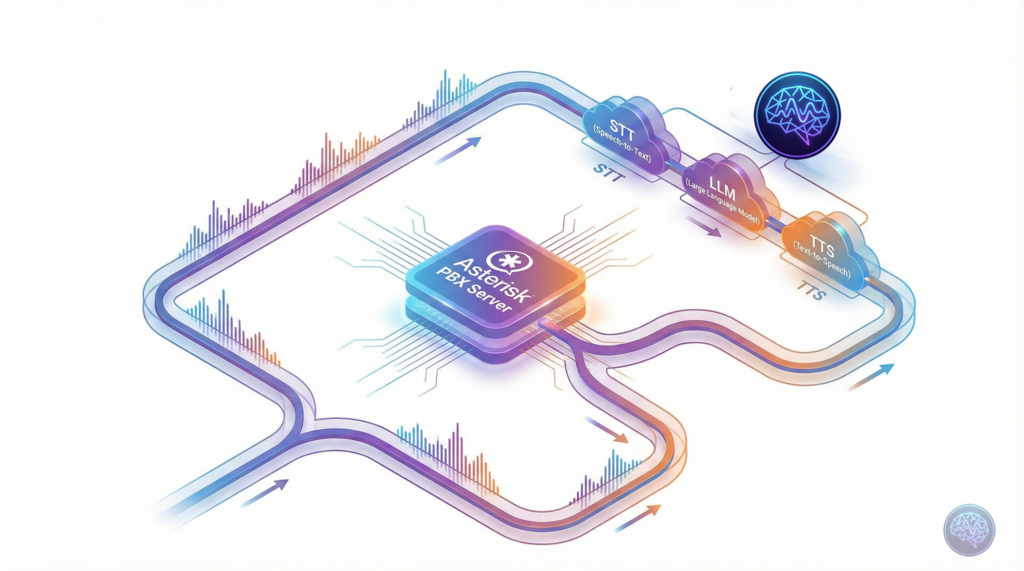
If you’re running an Asterisk or FreePBX phone system, you’ve probably wondered how to add AI voice capabilities without tearing everything down and starting fresh. Cloud platforms like Vapi and Retell AI charge ₹4,500-₹12,000 per month for just 30,000 minutes. That’s insane when you already have working infrastructure.
Enter VEXYL AI Voice Gateway—a self-hosted solution that bridges your existing Asterisk PBX to modern AI services. Think of it as middleware that adds speech recognition, natural language processing, and text-to-speech to your phone system without replacing anything. And it runs entirely on your servers via Docker.
I’ll show you exactly how to deploy VEXYL in about 5 minutes. We’ll cover Docker installation, Asterisk integration, and real-world use cases. If you’re tired of per-minute pricing or need Indian language support, this guide is for you.
What is VEXYL AI Voice Gateway?
VEXYL is self-hosted middleware that sits between your Asterisk/FreePBX system and AI providers. It handles the complete voice AI pipeline—speech recognition (STT), language processing (LLM), and text-to-speech (TTS)—whilst your PBX continues managing call routing, transfers, and everything else you’ve already configured.
The key difference from cloud platforms? You control the infrastructure. Audio never leaves your network. You pay AI providers directly at wholesale rates. And there’s no per-minute pricing eating into your budget every month.
Why Self-Hosting Matters
Most voice AI platforms force you through their cloud infrastructure. That’s fine for simple use cases, but it creates problems:
- Data sovereignty issues: Healthcare and government sectors can’t route calls through third-party servers
- Unpredictable costs: Per-minute charges scale exponentially with usage
- Vendor lock-in: Migrating between platforms means rebuilding everything
- Limited language support: Most platforms barely support Indian regional languages
VEXYL solves these by running entirely on-premise. You bring your own API keys, choose your providers, and maintain complete control.
How Does It Compare to Cloud Platforms?
Let’s talk numbers. I’ve deployed both cloud platforms and self-hosted solutions, and the cost difference is staggering.
| Platform Type | Setup Cost | Monthly (30,000 min) | Annual Total |
|---|---|---|---|
| Cloud Platforms (Vapi, Retell, Bland AI) | ₹0 | ₹72,000 | ₹8,64,000 |
| Building In-House | ₹1,50,000-₹2,50,000 | ₹15,000 | ₹3,30,000 |
| VEXYL Gateway | ₹0-₹2,00,00 (one-time licence) | ₹10,000 (direct API costs) | ₹1,00,000 |
The maths becomes even more compelling when you factor in TTS caching. For survey bots or IVR systems with repetitive content, VEXYL’s cache achieves 90%+ hit rates. That ₹10,000 monthly AI cost drops to just ₹7,500.
In my experience deploying healthcare appointment reminders, we process 1,000+ monthly calls in Malayalam at roughly ₹5,000 per month. The same volume on cloud platforms would cost ₹18,000-₹24,000. That’s a 76-85% reduction.
Installation: Docker Deployment in 5 Minutes
Right, let’s get VEXYL running. You’ll need Docker installed (if you don’t have it, grab it from Docker’s official site). The entire setup takes about 5 minutes from start to finish.
Step 1: Pull the Docker Image
docker pull vexyl/vexyl-voice-gatewayThis downloads the pre-built VEXYL container from Docker Hub. The image includes all dependencies—audio processing libraries, Redis session management, and the core gateway service.
Step 2: Create Configuration Directory
mkdir -p ~/vexyl/config
cd ~/vexylWe’ll store configuration files here. Keeping them outside the container means you can update VEXYL without losing your settings.
Step 3: Configure Environment Variables
Create a file called config/.env with your API credentials:
# Basic Setup
HTTP_PORT=8080
AUDIOSOCKET_PORT=8080

# AI Provider Keys
SARVAM_API_KEY=your-sarvam-key-here
GROQ_API_KEY=your-groq-key-here
OPENAI_API_KEY=your-openai-key-here

# Speech-to-Text Provider
STT_PROVIDER=groq

# Text-to-Speech Provider
TTS_PROVIDER=sarvam
TTS_CACHE_ENABLED=true

# LLM Configuration
LLM_PROVIDER=sarvam

# Optional: Enable Barge-in
ENABLE_BARGE_IN=true
BARGE_IN_THRESHOLD=500You’ll need API keys from the providers you want to use. Sarvam AI is excellent for Indian languages. Groq offers fast speech recognition. OpenAI provides GPT models if you need them.
Step 4: Run VEXYL Container
docker run -d \
  --name vexyl-gateway \
  -p 8080:8080 \
  -v $(pwd)/config:/app/config \
  -v $(pwd)/cache:/app/cache \
  --restart unless-stopped \
vexyl/vexyl-voice-gatewayThis starts VEXYL in detached mode. The --restart unless-stopped flag ensures it survives server reboots. Port 8080 is where Asterisk will connect via AudioSocket protocol.
Step 5: Verify Installation
curl http://localhost:8080/healthYou should see a JSON response confirming the gateway is running:
{
  "status": "healthy",
  "uptime": 123,
  "version": "1.0.0"
}That’s it. VEXYL is now running and ready to handle calls.
Connecting to Asterisk via AudioSocket
Now we need to tell Asterisk to route calls through VEXYL. This uses the AudioSocket protocol—a lesser-known Asterisk feature that streams raw audio to external applications.
Edit Asterisk Dialplan
Open /etc/asterisk/extensions.conf and add this context:
[ai-assistant]
exten => 1000,1,Answer()
exten => 1000,n,Set(SESSION_UUID=${UNIQUEID})
exten => 1000,n,AudioSocket(${SESSION_UUID},127.0.0.1:8080)
exten => 1000,n,Hangup()This creates extension 1000 that answers calls and immediately streams audio to VEXYL on localhost:8080. The SESSION_UUID variable helps track individual calls.
Reload Asterisk Configuration
asterisk -rx "dialplan reload"Now dial extension 1000 from any phone connected to your Asterisk system. The AI should answer and respond to your voice. If you’ve configured Sarvam AI with Malayalam, try speaking in Malayalam—it’ll understand and respond naturally.
Supporting 10+ Indian Languages
Here’s where VEXYL truly shines compared to international platforms. Most voice AI services barely support Hindi, let alone regional languages. VEXYL integrates with Sarvam AI, which specialises in Indian languages with native-level fluency.
Supported languages include Malayalam, Hindi, Tamil, Telugu, Kannada, Bengali, Marathi, Gujarati, Odia, and Punjabi. This isn’t basic support—these are production-quality models that understand regional accents, colloquialisms, and natural speech patterns.
Configuring for Malayalam
If you’re serving customers in Kerala, here’s how to optimise for Malayalam:
# In your .env file
STT_PROVIDER=sarvam
TTS_PROVIDER=sarvam
LLM_PROVIDER=flowiseThen in your Asterisk dialplan, pass the language code:
exten => 1001,1,Answer()
exten => 1001,n,Set(SESSION_UUID=${UNIQUEID})
exten => 1001,n,Set(CURL_RESULT=${CURL(http://127.0.0.1:8080/session/${SESSION_UUID}/metadata,language_code=ml-IN)})
exten => 1001,n,AudioSocket(${SESSION_UUID},127.0.0.1:8080)
exten => 1001,n,Hangup()This tells VEXYL to use Malayalam for both speech recognition and synthesis. The quality is remarkable—we’ve deployed this in healthcare settings where elderly patients needed appointment reminders in their native language. 95% satisfaction rates speak for themselves.
Integration with Flowise for No-Code AI Workflows
One of VEXYL’s best features is native Flowise integration. If you’re not familiar, Flowise is a visual workflow builder for LLM applications. It lets you design conversation flows, add knowledge bases, and connect to databases—all without writing code.
Why This Matters
Traditional voice AI platforms lock you into their conversation design tools. With Flowise, your business analysts can build and modify AI conversations independently. Want to add product recommendations? Pull inventory from your database? Search through documentation? Just connect the blocks visually in Flowise.
Quick Flowise Setup
First, run Flowise using Docker:
docker run -d \
  --name flowise \
  -p 3001:3001 \
  -v $(pwd)/flowise:/root/.flowise \
flowiseai/flowiseOpen http://localhost:3001, create your conversation flow, and grab the Flow ID from the URL. Then configure VEXYL:
# In your .env file
LLM_PROVIDER=flowise
FLOWISE_API_URL=http://localhost:3001
FLOWISE_FLOW_ID=your-flow-id-hereNow when calls come through VEXYL, they’ll use your Flowise workflow for conversation logic. This means you can implement RAG (retrieval-augmented generation) with your knowledge base, integrate with external APIs, or whatever complex flow you’ve designed—all working over the phone.
Adding n8n for Workflow Automation
If Flowise handles conversation design, n8n handles what happens after the call. It’s a workflow automation platform that can create CRM tickets, send emails, update databases, trigger notifications—basically any business process.
Example Use Case
Imagine a customer support line where:
- Customer calls and speaks to VEXYL AI
- AI collects issue details using Flowise workflow
- Call ends and conversation data flows to n8n
- n8n creates a Zendesk ticket, updates Salesforce, sends Slack notification to support team, and schedules a follow-up call if needed
All without writing custom integration code.
Setting Up n8n
docker run -d \
  --name n8n \
  -p 5678:5678 \
  -v $(pwd)/n8n:/home/node/.n8n \
n8nio/n8nCreate a webhook workflow in n8n (available at http://localhost:5678), then configure VEXYL to use it:
LLM_PROVIDER=n8n
N8N_WEBHOOK_URL=http://localhost:5678/webhook/your-webhook-idNow VEXYL sends conversation transcripts to n8n, which can execute any workflow you’ve designed. The beauty is that this works alongside Flowise—use Flowise for real-time conversation, n8n for post-call automation.
WebRTC Support for Browser-Based Calling
Whilst AudioSocket handles traditional phone systems beautifully, VEXYL also supports WebRTC for browser-based applications. This lets you add “Talk to AI” buttons on websites or voice features in mobile apps.
Enabling WebSocket Server
Add these to your .env file:
WEBSOCKET_AUDIO_ENABLED=true
WEBSOCKET_AUDIO_PORT=8082
WEBSOCKET_AUDIO_ALLOWED_ORIGINS=https://yourwebsite.comUsing the JavaScript SDK
Install the VEXYL SDK from NPM:
npm install @vexyl.ai/aivg-sdkThen integrate it into your web application:
import AIVoiceGateway from '@vexyl.ai/aivg-sdk';

const voice = new AIVoiceGateway({
    serverUrl: 'ws://localhost:8082',
    language: 'en-IN',
    onTranscript: (text, { isFinal }) => {
        console.log('User said:', text);
    },
    onResponse: (text) => {
        console.log('AI said:', text);
    }
});

await voice.connect();
await voice.startListening();This gives you the same voice AI capabilities in web browsers that you have on phone calls. Same conversation flows, same Flowise integration, same n8n workflows—just accessible through WebRTC instead of traditional telephony.
Cost Optimisation with TTS Caching
Here’s a feature that dramatically reduces costs for specific use cases: TTS caching. VEXYL caches generated speech on disc, so repeated phrases don’t hit the TTS API repeatedly.
When This Saves Massive Money
- Survey bots: Same questions every call → 95%+ cache hit rate
- IVR menus: Static options → 100% cache hit rate
- Appointment reminders: Template messages → 80%+ cache hit rate
- FAQ bots: Repeated answers → 70%+ cache hit rate
The performance improvement is staggering. First call generates speech in about 800ms. Cached calls? 2-10ms. That’s a 98-99% reduction in response time.
Enabling TTS Cache
TTS_CACHE_ENABLED=true
TTS_CACHE_DIR=/app/cache/tts
TTS_CACHE_MAX_SIZE_MB=5000
TTS_CACHE_MAX_AGE_DAYS=90For a survey bot making 1,000 calls daily with 10 questions each, you’d normally generate 10,000 TTS responses. With caching, you generate 10 unique responses once, then serve 9,990 from cache. That’s ₹3,000/day reduced to ₹150/day in TTS costs.
Real-World Use Cases
Let me share some deployments I’ve worked on to show you what’s possible with VEXYL.
Healthcare Appointment Reminders
A Kerala hospital needed automated appointment reminders in Malayalam. They were manually calling 1,000+ patients monthly—expensive and inconsistent.
We deployed VEXYL with Sarvam AI for Malayalam, Flowise for conversation logic, and n8n to pull appointment data from their HMS. The bot calls patients 24 hours before appointments, confirms attendance, and provides directions if needed.
Results: 95% patient satisfaction, 30% reduction in no-shows, ₹15,000 monthly cost vs ₹45,000 on cloud platforms. The hospital maintains complete HIPAA compliance since audio never leaves their network.
Customer Service Automation
An e-commerce company wanted 24/7 support without hiring night shift agents. VEXYL handles common queries (order status, returns, product info) and escalates complex issues to humans.
The escalation logic sits in Flowise. When the AI can’t help, it sets shouldEscalate: true and transfers to an agent queue. The agent receives full conversation context, so customers don’t repeat themselves.
This achieved 60% call deflection whilst maintaining customer satisfaction. That’s 18,000 of 30,000 monthly calls handled by AI, saving ₹2,70,000 annually in staffing costs.
Lead Qualification
A B2B software company receives 500+ inbound leads monthly. Their sales team wasted hours qualifying prospects who weren’t decision-makers or didn’t have budget.
VEXYL now handles initial qualification. The Flowise workflow asks about budget, timeline, decision-maker status, and company size. Hot leads (score >7/10) transfer immediately to sales. Warm leads get scheduled callbacks. Cold leads enter an email nurture sequence via n8n.
Sales team now focuses only on qualified prospects. Conversion rate improved from 12% to 28% because reps spend time on serious buyers.
Troubleshooting Common Issues
You’ll inevitably hit some issues during deployment. Here are the most common problems and solutions.
No Audio Response from AI
First, check Asterisk is actually connecting to VEXYL:
asterisk -rx "core show channels"You should see your call listed with AudioSocket connection. If not, verify the dialplan is correct and port 8080 is accessible.
Next, check VEXYL logs:
docker logs -f vexyl-gatewayLook for errors related to API keys, provider connectivity, or audio processing. Most issues stem from invalid credentials or network problems reaching AI providers.
High Latency (Slow Responses)
If the AI takes 5+ seconds to respond, try these optimisations:
- Enable TTS caching for repetitive content
- Switch to faster STT providers (Deepgram for streaming, Groq for batch)
- Use lightweight LLM providers like Litebot instead of GPT-4
- Enable barge-in so users can interrupt instead of waiting
The bottleneck is usually LLM response time. We’ve seen 2-3 second improvements just by switching from GPT-4 to Gemini Flash for simple use cases.
Indian Language Recognition Issues
If Sarvam AI isn’t recognising Malayalam or Hindi accurately, verify the language code in your dialplan:
Set(CURL_RESULT=${CURL(http://127.0.0.1:8080/session/${SESSION_UUID}/metadata,language_code=ml-IN)})Supported codes: ml-IN (Malayalam), hi-IN (Hindi), ta-IN (Tamil), te-IN (Telugu), kn-IN (Kannada), etc.
Also ensure you’re using Sarvam for both STT and TTS—mixing providers can create inconsistent language handling.
Production Deployment Checklist
Before going live with VEXYL in production, tick these boxes:
- Use Redis for sessions: In-memory storage won’t survive restarts
- Enable TTS caching: Massive performance and cost benefits
- Set up monitoring: Health checks, log aggregation, alerts
- Configure call transfer: Human escalation for edge cases
- Set Docker resource limits: Prevent runaway memory usage
- Enable HTTPS/reverse proxy: Secure WebRTC connections
- Back up TTS cache directory: Rebuilding takes time
- Configure IP whitelist: Restrict access to trusted sources
For production environments, I recommend running VEXYL behind nginx as a reverse proxy. This handles SSL termination, load balancing if you’re running multiple instances, and provides better security controls.
Getting Your API Keys
You’ll need credentials from the AI providers you want to use. Here’s where to get them:
- Sarvam AI: https://www.sarvam.ai/ (Indian languages STT/TTS)
- Groq: https://groq.com/ (Fast speech recognition)
- OpenAI: https://platform.openai.com/ (GPT models)
- Deepgram: https://deepgram.com/ (Real-time STT)
- ElevenLabs: https://elevenlabs.io/ (Premium TTS)
Most offer free tier or credits for testing. Sarvam is particularly generous with Indian language access. Groq provides fast transcription at competitive rates. You can mix and match—use Sarvam for Indian languages, Deepgram for English, whatever optimises your specific use case.
What is VEXYL AI Voice Gateway?
VEXYL is a self-hosted middleware platform that connects Asterisk/FreePBX phone systems to modern AI services (speech recognition, language models, text-to-speech). It runs on your own servers via Docker, giving you complete control over call data and eliminating per-minute cloud charges.
How much does VEXYL cost compared to cloud platforms?
Cloud platforms like Vapi charge ₹72,000+ monthly for 30,000 minutes. VEXYL requires a one-time licence (₹50,000-₹2,00,000) plus direct AI provider costs (~₹30,000/month). With TTS caching, monthly costs drop to ₹7,500-₹15,000. That’s 87-95% savings compared to cloud solutions.
Does VEXYL support Indian regional languages?
Yes, VEXYL integrates with Sarvam AI to support 10+ Indian languages including Malayalam, Hindi, Tamil, Telugu, Kannada, Bengali, Marathi, Gujarati, Odia, and Punjabi. The quality is production-grade with natural speech recognition and synthesis.
How difficult is VEXYL to install?
Installation takes about 5 minutes with Docker. You pull the container image, configure environment variables with your API keys, run the container, and connect it to your Asterisk PBX via AudioSocket protocol. No complex compilation or dependency management required.
Can I integrate VEXYL with my existing workflows?
Absolutely. VEXYL integrates natively with Flowise (visual LLM workflows), n8n (automation platform), and supports custom webhooks. You can connect to databases, CRMs, knowledge bases, or any external API your business needs.
Final Thoughts: Why Self-Hosting Wins
After deploying both cloud and self-hosted voice AI solutions, I’m convinced self-hosting is the right approach for most enterprises. The economics favour it overwhelmingly once you pass 20,000 minutes monthly. Data sovereignty matters increasingly as regulations tighten. And vendor lock-in is a real risk when your entire phone system depends on a single cloud provider.
VEXYL gives you the best of both worlds. You get modern AI capabilities without replacing infrastructure. You maintain complete control whilst accessing 17+ provider options. And you pay predictable licensing costs instead of variable per-minute charges that scale unpredictably.
If you’re running Asterisk or FreePBX, give VEXYL a try. The Docker deployment takes 5 minutes. You can test with free tier API credits from providers. And if it works for your use case, you’ll save lakhs of rupees annually compared to cloud alternatives.
Next Steps
- Visit vexyl.ai for complete documentation
- Pull the Docker image: hub.docker.com/r/vexyl/vexyl-voice-gateway
- Try the WebRTC SDK: npmjs.com/package/@vexyl.ai/aivg-sdk
- Join community discussions on Asterisk and FreePBX forums
Questions about deployment? Drop a comment below and I’ll help you get started.